All Mainstream AI Programming Tools Are Based on Codex
This article aims to clarify the confusion surrounding various AI programming tools for newcomers.
Recently, many have been overwhelmed by the variety of AI programming tools: Copilot, Cursor, Claude Code, GitHub Agent, etc. Which one is foundational?
Your Copilot is essentially a wrapper; the underlying logic of Cursor is also based on it. Even the various Agents that are currently popular are encroaching on the territory defined by Codex. Let’s break down what Codex is, how to use it, how it differs from similar tools, and why it remains the benchmark.

01 What is Codex?
OpenAI’s Codex is not just a coding tool; it is a local desktop-level AI assistant that can take control of your computer files, browser, and software to automate nearly all knowledge work.
02 Key Differences Between Codex and ChatGPT/Claude
- ChatGPT/Claude: Cloud-based sandbox; files are online and cannot truly interact with your computer.
- Codex: Local system-level access; it can read and write your computer files, control the browser, and operate software like a real assistant working on your computer.
03 Seven Core Capabilities of Codex (Simplified)
- Full Access to Local Files: Directly reads images, documents, and spreadsheets from your computer folders, automating processing, OCR, summarization, and report generation.
- Persistent Memory: Automatically remembers your habits, preferences, and styles; you can also manually set rules for future adherence.
- Plugin Connectivity: Integrates with over 100 applications like Gmail, Notion, and Slack, helping you check emails, organize information, and analyze data.
- Reusable Skills: Saves common workflows as “skill templates” for one-click execution without rewriting instructions each time.
- Native Image Generation: Built-in access to OpenAI’s strongest image model, generating product images, covers, and design graphics directly.
- Browser and Computer Control: Can open software, click the mouse, operate interfaces, and test web pages, effectively taking over your computer to complete complex tasks.
- Automated Scheduled Tasks: Set once, it can automatically run processes on a schedule, such as weekly data summaries, email organization, and report generation.
04 Easter Egg Feature: Chronicle Environmental Awareness
Codex continuously observes your screen, understanding what you are doing, proactively offering suggestions, filling in content, and assisting with your work (use with caution due to potential risks). Additionally, it connects your phone to your computer for remote control.

05 Core Concept
Codex is not a chatbot; it is a personal AI workstation: local files = hard drive, memory = preferences, plugins = peripherals, skills = programs, automation = scheduled tasks, awareness = eyes. AI has officially moved from a “dialog box” to a “real computer workflow”.
In summary: Codex is the large model developed by OpenAI specifically for coding, the pioneer of AI programming, the foundational engine, and the industry standard.
It is not a plugin, not an editor, not a toolchain; it is a “code brain” that understands human language, writes code, understands logic, debugs, and can even complete a project from 0 to 1.
In 2021, OpenAI first released Codex, which directly revolutionized the industry—previously, AI could only write a few lines of toy code; with Codex, it can understand complex requirements, generate complete functions, interface with APIs, write unit tests, and even debug online bugs.
From that day on, AI programming transformed from a “novelty” into “real productivity”.
06 How to Use Codex
Many believe Codex is exclusive to programmers, which is a misconception.
Its usage is simple and straightforward:
-
Generate Code from Natural Language: You don’t need to understand syntax, remember APIs, or check documentation. Just speak plainly:
“Write a Python script to batch scrape webpage titles and save them to Excel with exception handling.” Codex will provide you with complete runnable code + comments + usage instructions, ready to run without modification.
-
Code Completion and Intelligent Suggestions: If you write half a function, it will automatically complete the remaining logic; if you write a variable, it will suggest usage; if you get stuck, it will provide solutions. It’s three times faster than thinking yourself, with over 90% accuracy.
-
Understand, Explain, Refactor, Debug: You can throw a piece of bad code at it:
“Why does this code throw an error? How can it be optimized? Can it be changed to asynchronous?” It will directly locate bugs, explain reasons, provide optimization suggestions, and refactor code, effectively acting as a senior architect available 24/7.
All you need to do is clearly articulate your requirements; Codex handles the rest.
-
Why is it the Top Choice?
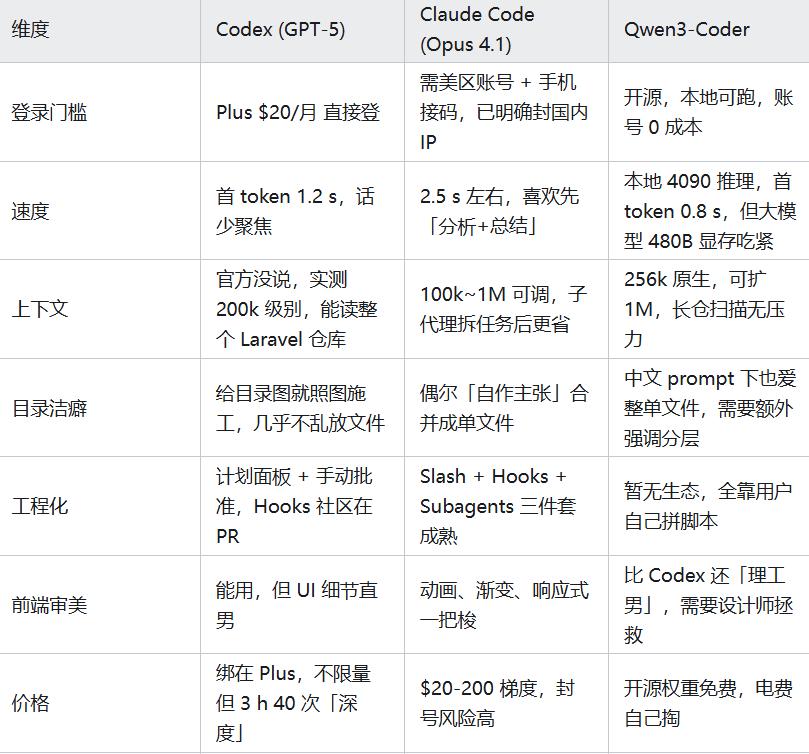
Currently, there are numerous AI programming tools: Copilot, Cursor, Claude Code, GitHub Agent, Windsurf, etc. They may seem flashy, but fundamentally they are all built on Codex with minor tweaks and rebranding. To put it simply, Codex has four major advantages over similar tools:
07 Depth of Understanding: Others See the Surface, Codex Understands Logic
Ordinary tools can only recognize keywords and write “similar” code; Codex can understand the business logic, implicit conditions, and boundary cases behind your requirements. When you say “make a login system,” it automatically considers password encryption, verification codes, SQL injection prevention, and session management—aspects that other tools completely overlook.
08 Code Quality: Others Write Toy Code, Codex Writes Industrial-Grade Code
Code generated by Copilot often has redundancies, vulnerabilities, and compatibility issues; Cursor can occasionally write well but is unstable and prone to errors. The code generated by Codex is standardized, concise, maintainable, high-performance, and ready for production environments. Many large companies still use Codex to generate core modules for good reason.
09 Ecosystem Compatibility: Others Limit Environments, Codex Adapts to All
Whether you use Python, Java, Go, JavaScript, C++; whether you are front-end, back-end, mobile, data analysis, web scraping, or automation; Codex supports all seamlessly without extra configuration. Switching tools doesn’t require changing habits, and switching languages doesn’t require relearning—this is true productivity.
Just a note: the cost-effectiveness of tokens is quite good, as shown in the image.

10 Fastest Iteration: Others Follow, Codex Leads
From 2021 to now, Codex has undergone numerous iterations:
- Initial Version: Basic code generation
- 2023: Upgraded to GPT-4 core, significantly enhancing reasoning and complex project capabilities
- 2025: New Codex release, supporting full-chain agents, autonomous PR writing, debugging, and end-to-end project management.
While others are still copying old features, Codex is already defining the next generation of AI programming—
The gap is not small; it’s generational.
Having more tools isn’t necessarily better; what matters is the robustness of the underlying model.
Many people follow trends and switch tools, using Cursor today, Claude Code tomorrow, and Windsurf the day after, only to find their efficiency hasn’t improved and things have become more chaotic.
A word of advice: Tools can change, but don’t lose the underlying logic.
Codex’s longevity isn’t due to marketing or packaging; it’s based on genuine understanding, code quality, ecosystem compatibility, and iteration speed. You can use Copilot, Cursor, or any tool, but remember: their ceiling is Codex’s floor.
Conclusion
AI programming is not a mystery; it’s not about being newer or flashier. The true determinant of potential is always the hard power of the underlying model.
Codex is the embodiment of that hard power. It may not be the easiest tool to use, but it is the root of all useful tools.
Understanding and utilizing it will help you grasp the essence of AI programming—it’s not about replacing humans, but transforming creativity directly into productivity.
Comments
Discussion is powered by Giscus (GitHub Discussions). Add
repo,repoID,category, andcategoryIDunder[params.comments.giscus]inhugo.tomlusing the values from the Giscus setup tool.